Interactive Bootstrap 5 Event Calendar Plugin - jQuery bs-calendar
| File Size: | 116 KB |
|---|---|
| Views Total: | 4528 |
| Last Update: | |
| Publish Date: | |
| Official Website: | Go to website |
| License: | MIT |
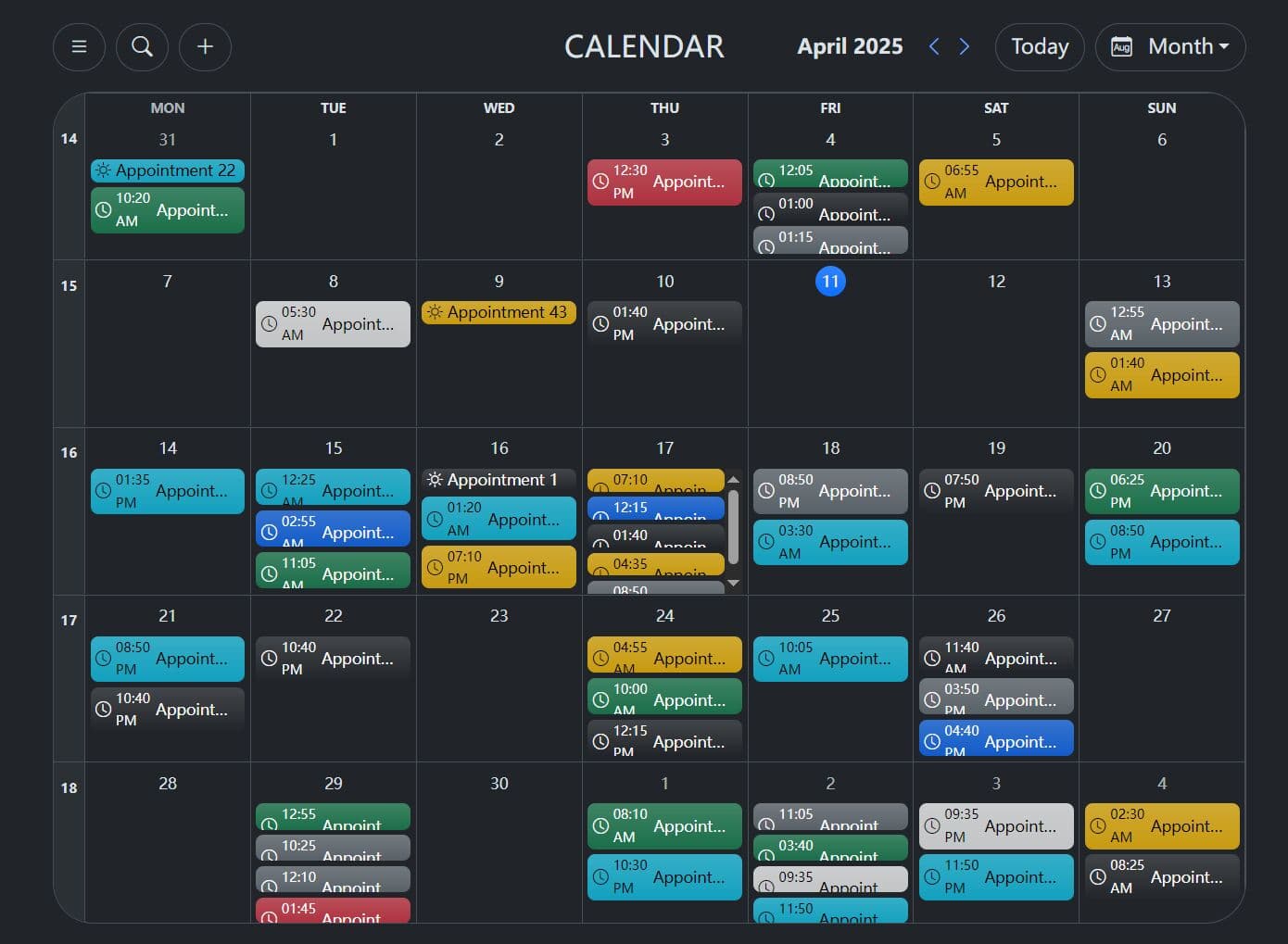
bsCalendar is a simple yet robust jQuery plugin for creating responsive, customizable, full-featured event calendars styled with the latest Bootstrap 5 framework.
It handles the basics well: rendering the calendar grid, switching calendar views, basic localization, and fetching event data from a backend.
You get controls for navigation, adding events (by clicking empty areas), and interacting with existing events (click to update/remove).
Key Features:
- Bootstrap 5 based: Uses Bootstrap's grid, components, and styling for a consistent look.
- Multiple Views: Switch between day, week, month, and year displays.
- Dynamic Data Loading: Fetch appointments/events from a backend API using the
urloption. - Interactive Events: Click empty cells to add events, click existing events for potential updates/removals (requires custom handling).
- Customizable Options: Configure locale, start day of the week, colors, icons, available views, and more.
- Light/Dark Mode: Adapts to Bootstrap's color modes.
- Localization: Translate labels like 'Day', 'Week', 'Today', etc., via the
translationsoption. - Search Functionality: Basic appointment search capability (if enabled).
- API Methods: Programmatically refresh, clear, update options, or destroy the calendar instance.
How to use it:
1. To get started, make sure you have jQuery library, Bootstrap framework, and Bootstrap Icons loaded in your document.
<!-- jQuery -->
<script src="/path/to/cdn/jquery.min.js"></script>

<!-- Bootstrap -->
<link rel="stylesheet" href="/path/to/cdn/bootstrap.min.css" />
<script src="/path/to/cdn/bootstrap.bundle.min.js"></script>

<!-- Bootstrap Icons -->
<link rel="stylesheet" href="/path/to/cdn/bootstrap-icons.min.css">
2. Download the plugin and add the 'bs-calendar.min.js' script to the document.
<script src="/path/to/dist/bs-calendar.min.js"></script>
3. Create a container to hold the event calendar.
<div id="myCalendar">
</div>
4. Initialize bs-calendar with default options.
$(document).ready(function() {
  $('#myCalendar').bsCalendar({
    // options here
  });
});
5. Add custom holidays to the calendar. It also supports for public holidays API integration. See 'openHolidays.js' in the zip for details.
$('#myCalendar').bsCalendar({
  holidays: function (data) {
    return new Promise((resolve, reject) => {
      Extract the start and end years from the input
      const startYear = new Date(data.start).getFullYear();
      const endYear = new Date(data.end).getFullYear();
      const locale = getLanguageAndCountry(data.locale);
      const openHolidays = new OpenHolidays();
      openHolidays.getPublicHolidays(locale.country, startYear + '-01-01', endYear + '-12-31', locale.language)
      .then(response => {
        console.log(response);
        const holidays = [];
        for (const holiday of response) {
          holidays.push({
            startDate: holiday.startDate,
            endDate: holiday.endDate,
            title: holiday.name[0].text,
          });
        }
        resolve(holidays);
      })
      .catch(error => {
        reject(error);
      });
    });
  },
});
6. Fetch data dynamically via the url option. When the view changes or the calendar loads initially, the internal fetchAppointments function kicks in:
- It determines the required date range (
fromDate,toDate) based on the current view or theyearfor the year view. If searching, it uses thesearchterm. - It constructs a
requestDataobject containing these parameters (view,fromDate,toDateoryearorsearch). - If
queryParamsis defined, it calls that function to potentially add more data to the request (like user IDs, filters). - It makes an AJAX request (or calls your provided function) using the
urland therequestData. It expects a JSON response containing an array of appointment objects, includingid,title,start,end,allDay,color, etc. - On success, it processes the returned appointments and renders them onto the calendar grid. It positions them based on their start/end dates and times.
- Error handling is included, and
debug: truehelps trace this process.
$(document).ready(function() {
  $('#myCalendar').bsCalendar({
    url: url
  });
});
// Example
async function url(query) {
  console.log('index url', query);
  await sleep(Math.floor(Math.random()));
  return new Promise((resolve, reject) => {
    try {
      const fromDate = query.fromDate ? new Date(`${query.fromDate}T00:00:00`) : null;
      const toDate = query.toDate ? new Date(`${query.toDate}T23:59:59`) : null;
      const search = query.search;
      if (search && !fromDate && !toDate) {
        const limit = query.limit;
        const offset = query.offset;
        return resolve(getAppointmentsBySearch(search, limit, offset));
      }

      if (query.view === 'year') {
        return resolve(generateDates(query.year));
      }
      const appointments = generateRandomAppointments(
        (fromDate || new Date('1970-01-01T00:00:00')).toISOString(),
        (toDate || new Date('9999-12-31T23:59:59')).toISOString(),
        query.view
      );
      const filteredAppointments = appointments.filter(appointment => {
        const appointmentStart = new Date(appointment.start);
        const appointmentEnd = new Date(appointment.end);
        return (
          (!fromDate || appointmentStart >= fromDate) &&
          (!toDate || appointmentEnd <= toDate)
        );
      });
      if (search) {
        const searchFilteredAppointments = filteredAppointments.filter(appointment => {
          return appointment.title.toLowerCase().includes(search.toLowerCase());
        });
        return resolve(searchFilteredAppointments);
      }
      resolve(filteredAppointments);
    } catch (error) {
        reject(error);
    }
  });
}
7. More configuration options and callback functions.
$('#myCalendar').bsCalendar({
  locale: 'en-UK',
  title: 'Calendar',
  startWeekOnSunday: true,
  showAddButton: true,
  navigateOnWheel: true,
  rounded: 5, // 1-5
  search: {
    limit: 10,
    offset: 0
  },
  startDate: new Date(),
  startView: 'month', // day, week, month, year
  defaultColor: 'primary',
  views: ['year', 'month', 'week', 'day'],
  holidays: null, //  an object containing 'federalState', 'country', and 'language'
  translations: {
    day: 'Day',
    week: 'Week',
    month: 'Month',
    year: 'Year',
    today: 'Today',
    appointment: 'Appointment',
    search: 'Type and press Enter',
    searchNoResult: 'No appointment found'
  },
  icons: {
    day: 'bi bi-calendar-day',
    week: 'bi bi-kanban',
    month: 'bi bi-calendar-month',
    year: 'bi bi-calendar4',
    add: 'bi bi-plus-lg',
    menu: 'bi bi-list',
    search: 'bi bi-search',
    prev: 'bi bi-chevron-left',
    next: 'bi bi-chevron-right',
    link: 'bi bi-box-arrow-up-right',
    appointment: 'bi bi-clock',
    appointmentAllDay: 'bi bi-brightness-high'
  },
  url: null, // The base URL for fetching external data, such as holiday or event information
  queryParams: null,
  topbarAddons: null,
  sidebarAddons: null,
  debug: false,
  formatter: {
    day: formatterDay,
    week: formatterWeek,
    allDay: formatterAllDay,
    month: formatterMonth,
    search: formatterSearch,
    holiday: formatterHoliday,
    window: formatInfoWindow,
    duration: formatDuration,
  },
  storeState: false,
  hourSlots: {
    height: 30, // one hour in px
    start: 0, // starting hour as integer
    end: 24 // ending hour as integer
  },
  onAll: function(eventName, params){},
  onInit: function(){},
  onAdd: function(data){},
  onEdit: function(appointment, extras){},
  onDelete: function(appointment, extras){},
  onView: function(view){},
  onBeforeLoad: function(requestData){},
  onAfterLoad: function(appointments){},
  onShowInfoWindow: function(appointment, extras){},
  onHideInfoWindow: function(){},
  onNavigateForward: function(view, from, to){},
  onNavigateBack: function(view, from, to){},
});
8. API methods.
// Reloads the current view data.
$('#myCalendar').bsCalendar('refresh');

// Removes all displayed appointments.
$('#myCalendar').bsCalendar('clear');

// Change options on the fly.
$('#myCalendar').bsCalendar('updateOptions', { startView: 'week' });

// Remove the calendar instance and clean up.
$('#myCalendar').bsCalendar('destroy');

// Jump to a specific date.
$('#myCalendar').bsCalendar('setDate', '2025-04-11');

// Jump back to the current date.
$('#myCalendar').bsCalendar('setToday');
9. Event handlers.
$('#myCalendar').on('all.bs.calendar', function (event, params) {
  // ...
})

$('#myCalendar').on('init.bs.calendar', function (event) {
  // ...
})

$('#myCalendar').on('add.bs.calendar', function (event, data) {
  // ...
})

$('#myCalendar').on('edit.bs.calendar', function (event, appointment, extras) {
  // ...
})

$('#myCalendar').on('delete.bs.calendar', function (event, appointment, extras) {
  // ...
})

$('#myCalendar').on('view.bs.calendar', function (event, view) {
  // ...
})

$('#myCalendar').on('navigate-forward.bs.calendar', function (event, view, from, to) {
  // ...
})

$('#myCalendar').on('navigate-back.bs.calendar', function (event, view, from, to) {
  // ...
})

$('#myCalendar').on('show-info.bs.calendar', function (event, appointment, extras) {
  // ...
})

$('#myCalendar').on('hide-info.bs.calendar', function (event) {
  // ...
})

$('#myCalendar').on('before-load.bs.calendar', function (event, requestData) {
  // ...
})

$('#myCalendar').on('after-load.bs.calendar', function (event, appointments) {
  // ...
})
10. Available utilities.
// Returns a formatted date using the extra Object
const formattedAppointmentTimespan = $.bsCalendar.utils.getAppointmentTimespanBeautify(extras, withDuration);
console.log(formattedAppointmentTimespan); // Wednesday, October 8th 2:10 p.m.-4:10 p.m. (2h)

// Available countries from the OpenHolidays API
$.bsCalendar.utils.openHolidayApi.getCountries('DE')
  .then(countries => {
    console.log('Countries loaded successfully:', countries);
  })
  .catch(error => {
    console.error('Error while fetching countries:', error.message || error);
  });

// Available languages from the OpenHolidays API
$.bsCalendar.utils.openHolidayApi.getLanguages('DE')
  .then(languages => {
    console.log(languages);
  });

// Available subdivisions (states, regions, etc.)
$.bsCalendar.utils.openHolidayApi.getSubdivisions('DE', 'DE')
  .then(subdivisions => {
    console.log(subdivisions);
  });

// Retrieve school holidays based on state and date range
$.bsCalendar.utils.openHolidayApi.getSchoolHolidays(
  'DE',          // Country (Germany)
  'BE',          // State (Berlin)
  '2025-01-01',  // Start date
  '2025-12-31'   // End date
)
  .then(schoolHolidays => {
    console.log(schoolHolidays);
  })

// Retrieve public holidays based on country, region, language, and date range
$.bsCalendar.utils.openHolidayApi.getPublicHolidays(
  'DE',          // Country (Germany)
  'BE',          // State (Berlin)
  'DE',          // Language
  '2025-01-01',  // Start date
  '2025-12-31'   // End date
)
  .then(publicHolidays => {
    console.log(publicHolidays);
  })

// Convert ICS string to appointments
const icsString = `BEGIN:VCALENDAR
  VERSION:2.0
  BEGIN:VEVENT
  SUMMARY:Team Meeting
  DTSTART:20251126T090000
  DTEND:20251126T100000
  DESCRIPTION:Discussing the Q4 roadmap.
  END:VEVENT
  END:VCALENDAR`;

const appointmentsFromIcs = $.bsCalendar.utils.convertIcsToAppointments(icsString);
console.log(appointmentsFromIcs);
Changelog:
v2.0.7 (2025-12-04)
- Design Update: Complete modernization of the calendar UI ("Technisches Dashboard" style).
- Performance Optimization: The buildByView function now includes a state check to avoid redundant DOM rebuilds.
- Bugfix: Fixed an issue in the year view where refreshing appointments (e.g., toggling a calendar) would inadvertently remove the day cells from the DOM due to aggressive cleanup in methodClear.
- New Feature: Calendar week numbers can now also be clicked, as long as the view is activated for it. Calendar weeks are displayed in the month and year views, as well as in the small month view.
v2.0.7 (2025-12-01)
- Performance Optimization: The buildByView function now includes a state check to avoid redundant DOM rebuilds.
- Styling: Added border property to customize the thickness of element borders.
- Bugfix: Fixed an issue in the year view where refreshing appointments (e.g., toggling a calendar) would inadvertently remove the day cells from the DOM due to aggressive cleanup in methodClear.
- Complete modernization of the calendar UI ("Technisches Dashboard" style).
v2.0.6 (2025-11-30)
- UI Overhaul: Redesigned the calendar list in the sidebar to use a modern "Active Stripe" layout.
- Logic: The active state of calendars is now fully interactive. Clicking a calendar in the sidebar toggles its state and triggers a view refresh.
- Data Fetching: Added calendarIds (an array of currently active calendar IDs) to the requestData object in fetchAppointments.
- Persistence: Calendar active states are now persisted to localStorage (if storeState is enabled) and correctly restored upon initialization.
- Normalization: Improved validation for settings.calendars. It now robustly handles defaults for title, color, and sets active to true if undefined.
v2.0.5 (2025-11-27)
- Added: New utility function convertIcsToAppointments(icsData) to parse raw ICS strings into calendar-compatible appointment objects.
v2.0.4 (2025-11-05)
- Replaced defaultColor with mainColor for consistency in color settings.
- Enhanced layout flexibility with updated flex-wrap classes in navigation and top bar elements.
- Improved color application logic for holidays, appointments, and current-time indicators.
- Standardized mainColor utilization for day and month view rendering.
- Addressed minor layout inconsistencies in year view style definitions.
- Improved parameter documentation in buildDayViewContent.
- Enhanced layout handling with better defaults for hour labels and week view adjustments.
- Implemented half-hour dashed lines for rows meeting height criteria.
- Added clearer time slot metadata and consistent styling for grid rows.
- Included current-time indicator logic for the 'today' view.
v2.0.3 (2025-11-04)
- Introduced stable, per-instance element IDs under data.elements (e.g., wrapperId, , , , , , , ) and refactored DOM queries to use these IDs. This reduces selector collisions and improves multi-instance and re-init stability.
- Improvements and bugfixes
v2.0.2 (2025-11-02)
- Refactor initialization logic in bs-calendar.js by improving settings merging, optimizing variable declarations, and enhancing code readability.
v2.0.0 (2025-11-01)
- Removed many features for Bootstrap 4 support.
- Add debug logging for public and school holiday API responses
2025-10-31
- Update composer.json to require Bootstrap v5 exclusively and increment version in the minified JavaScript file.
v1.2.12 (2025-10-29)
- Add: totalMinutes and totalSeconds to appointment.extras object
v1.2.11 (2025-10-28)
- Add: util function getAppointmentTimespanBeautify
v1.2.10 (2025-10-28)
- Add configurable showAddButton option.
- Fix: Normalize and deduplicate settings.views after merging defaults, data-attributes and passed options to avoid duplicating view entries in the view dropdown (prevents rendering the same view multiple times).
- Fix: Ensure settings.views accepts comma-separated strings and invalid values gracefully (falls back to sensible defaults).
- Improvement: Replace locale-dependent "KW" week label with a language-neutral compact week label ("W42") for UI, store ISO week ("YYYY-Www") in a data-attribute, and add a localized date-range tooltip for better international clarity.
v1.2.6/7 (2025-07-24)
- Added formatterAllDay for handling all-day appointment formatting.
v1.2.5 (2025-07-23)
- Added empty object validation in isValueEmpty utility.
- Enhanced day view handling
v1.2.5 (2025-07-08)
- Remove redundant bg-body and bg-body-tertiary classes
v1.2.4 (2025-07-08)
- Update default options formatting and add new click handling logic
2025-07-02
- Introduced the `onAfterLoad` callback for custom actions after data loading.
- Added `after-load` event triggers across various appointment loading flows.
2025-07-01
- Add holiday API integration and improve utilities
2025-06-30
- Add holiday API integration to bs-calendar utilities
2025-05-08
- Add localization and state persistence to bs-calendar
2025-04-25
- Remove unnecessary 'form-check-input' class from checkbox
2025-04-17
- Removed the unused OpenHolidays.js file and adjusted the bs-calendar defaults including locale, wheel navigation, and title formatting.
2025-04-16
- Add dynamic current-time indicator and refactor slot handling
2025-04-15
- Enhance holiday settings and rendering logic.
2025-04-14
- Refactor holiday loading and improve settings structure
2025-04-12
- Add support for school holidays in calendar
This awesome jQuery plugin is developed by ThomasDev-de. For more Advanced Usages, please check the demo page or visit the official website.
- Prev: Lightweight Single & Multi-Month Picker jQuery Plugin
- Next: None