Toggle Visibility Of Elements Based On Select - jQuery Toggler
| File Size: | 6.16 KB |
|---|---|
| Views Total: | 650 |
| Last Update: | |
| Publish Date: | |
| Official Website: | Go to website |
| License: | MIT |
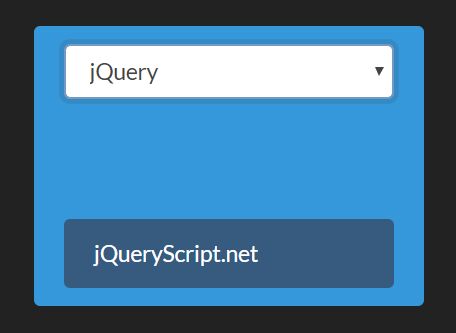
Toggler is a small jQuery content toggle plugin that conditionally shows & hides HTML elements depending on the value in a select dropdown.
How to use it:
1. Download and place the minified version of the toggler plugin after jQuery.
<script src="https://code.jquery.com/jquery-3.3.1.slim.min.js"
        integrity="sha384-q8i/X+965DzO0rT7abK41JStQIAqVgRVzpbzo5smXKp4YfRvH+8abtTE1Pi6jizo"
        crossorigin="anonymous"></script>
<script src="jquery.toggler.js"></script>
2. Create elements you want to toggle the visibility.
- data-toggle-condition: selector of the select element
- data-toggle-value: conditionally show/hide the element base on this value
<div class="conditional"
     data-toggle-condition="demo"
     data-toggle-value="jqueryscript">
     jQueryScript.net
</div>

<div class="conditional"
     data-toggle-condition="demo"
     data-toggle-value="cssscript">
     CSSScript.com
</div>
3. Create a select element to toggle the visibility of the elements you specify.
<select name="demo" id="demo" data-toggler="demo">
  <option>--- Select An Option ---</option>
  <option value="jqueryscript">jQuery</option>
  <option value="cssscript">CSSScript</option>
</select>
4. Hide the elements on page load.
.conditional {
  display: none;
}
5. Call the function and done.
$('[data-toggler]').toggler();
6. Customize the toggler & solver functions.
<div class="conditional"
     data-toggle-condition="demo"
     data-toggle-value="cssscript"
     data-toggle-solver="yourSolver"
     data-toggle-function="yourToggler">
     CSSScript.com
</div>
$('[data-toggler]').toggler({
  solvers: {
    value: function(el, param, item, opts) {
      var val = el.val();
      return $.isArray(param) ? param.indexOf(val) >= 0 : param == val;
    },
    valueNot: function(el, param, item, opts) {
      var val = el.val();
      return !opts.solvers.value(el, param, item, opts);
    },
    oneOf: function(el, param, item, opts) {
      var ret = false,
        conditions = item.data('toggle-condition').split('|');
      if (conditions) {
        var value = item.data('toggle-value');
        for (var i = 0; i < conditions.length; i++) {
          var condition = conditions[i],
            element = $('[data-toggler=' + condition + ']');
          if ( element.val() == value ) {
            ret = true;
          }
        };
      }
      return ret;
    }
  },
  togglers: {
    display: function(el, toggle, opts) {
      el.css('display', toggle ? 'block' : 'none');
    },
    enabled: function(el, toggle, opts) {
      el.prop('disabled', !toggle);
    }
  }
});
This awesome jQuery plugin is developed by biohzrdmx. For more Advanced Usages, please check the demo page or visit the official website.